Explainer Video Production Checklist For Small Businesses
Cramming every product feature into a single video is a fast way to confuse prospects and waste your budget on endless visual revisions. Use this step-by-step production checklist to nail your script structure, select the right animation style, and protect your return on investment.
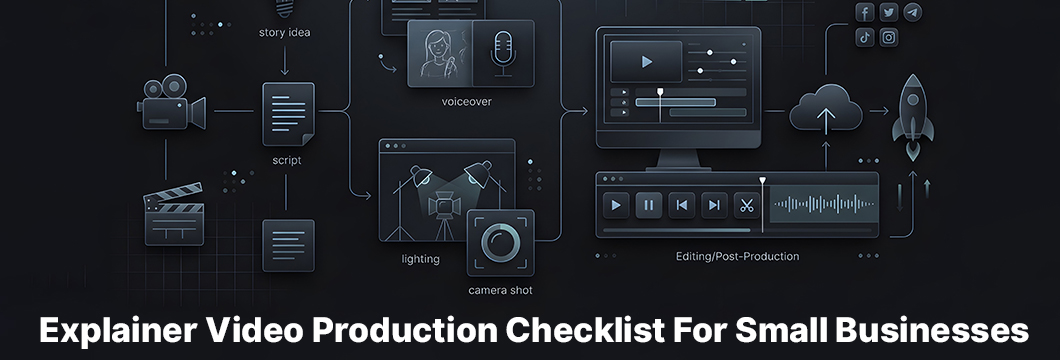
Plan Your Explainer Video
Jumping straight into animation or scriptwriting without a clear goal is a recipe for wasted budget. Before you write a single word, decide exactly what you want this video to achieve for your company. A solid explainer video production checklist for small businesses always starts with this planning phase. Establish one primary metric for success, such as direct trial sign-ups or a drop in customer support inquiries, so you can measure your return later.
What Actual Problem Your Explainer Video will Solve?
Many small businesses try to squeeze every single feature of their product into a single video. This action overwhelms viewers and dilutes your message. Instead, identify the single biggest pain point your audience faces and explain how your offer fixes it. Keep your explanation so simple that a customer can understand it in ten seconds.
Audience Mapping: Tailoring Tone for B2B Tech vs DTC Brands
Your target audience determines how you speak, look, and present your product. For example, B2B tech startups need a professional, clear tone that focuses on efficiency and business value. On the other hand, direct-to-consumer brands usually perform better with friendly, emotional storytelling and vibrant visuals. Matching your brand's tone to your buyer's expectations prevents early drop-off and builds trust.
The Scriptwriting Blueprint: Mechanics of a High-Converting Story
The script is the blueprint for your entire video, and even the most beautiful animation cannot save a weak story. Focus on writing a narrative that addresses your customer directly and walks them through a logical journey. Read the script aloud multiple times to ensure the pacing feels natural and the language sounds conversational. Keep the focus entirely on the viewer's needs rather than your own self-praise.
Looking for B2B Explainer Video Production Experts?
Our video creators are ready to help. Check our works!
Important Rule: Keeping Your Runtime strictly Under 120 Seconds
Attention spans are short, so your explainer video should ideally run between 60 and 90 seconds. A good rule of thumb is to limit your script to 150 words per minute of video. This timing gives the voiceover artist room to breathe and allows your visual elements to tell the story without feeling rushed.
Effective Explainer Video Structure: Hook, Problem, Solution, CTA
To keep viewers watching, structure your video with a proven four-part framework. Start with an engaging hook in the first five seconds, introduce the customer's problem, present your product as the solution, and end with a clear call to action. This progression leads the viewer naturally from curiosity to taking the next step. Experts from Ultimate Video developed this structure through hands-on experience with dozens of large-scale projects.
Art Direction, Storyboarding and Style Selection
Your storyboard translates the written script into visual frames before you start animating or filming. At this stage, you must match your creative vision with your actual budget. High-end 3D animation costs significantly more than clean, simple vector illustrations. Choosing a style that matches your budget from the start prevents costly revisions and delays.
Choosing Your Medium: Character Animation, Motion Graphics, or Screencasts
Different products require different visual styles to explain how they work. Character animation builds emotional connection, while motion graphics work well for explaining abstract concepts or data. If you sell software, simple screencasts showing the actual user interface are often the most practical and budget-friendly choice.
Execution Strategy: In-House Production vs. Professional SaaS Video Agencies
Small businesses often struggle to decide whether to create videos in-house or hire outside help. While doing it yourself saves upfront cash, it requires a lot of your team's time and can result in a less polished product. Outsourcing to experts allows you to focus on running your business while ensuring a high-quality final cut.
Evaluating Explainer Video Production Services For Small Business
When looking for professional Explainer Video Production Services For Small Business, prioritize partners with a clear process and transparent pricing. Look at their past work to see if they can adapt to different industry styles and explain complex ideas simply. A good production partner will ask deep questions about your business goals rather than just offering a generic template.
The True Cost of DIY: Tool Subscriptions, Voiceover Licensing, and Time Sink
Creating your own video might seem cheap, but the hidden costs add up quickly. You will need to pay for software subscriptions, stock music licenses, and professional voiceover talent. Additionally, the hours your team spends learning these tools often cost more in lost productivity than hiring an agency.
Post-Production Polish and Technical Delivery
Post-production is where your video comes together through editing, sound effects, and color grading. Even minor adjustments to the timing of an animation can make the entire piece feel much more professional. Make sure you get feedback from a small test group before exporting your final files in the correct formats.
Sound Design (SFX) and Captions: Optimizing for Silent Social Autoplay
Many viewers watch social media videos on mute, which makes captions and on-screen text essential. Professional sound design, including background music and sound effects, adds depth for those who do listen. However, your video must still deliver its full message clearly through text and visuals alone.
What You Must Do To Integrate the Video into Your Sales Funnel Correctly (Measuring ROI)
Success is about more than just video views; it is about sales results. By using explainer videos in sales funnel stages, you can guide prospects from initial awareness to final purchase. Place your video on high-traffic landing pages or include it in your email outreach campaigns to improve your overall conversion rates.
Conclusion
Creating a successful explainer video requires a structured approach, from writing a tight script under 120 seconds to choosing a visual style that fits your budget. While a DIY route is possible, partnering with professional explainer video production services for small business often saves valuable time and ensures a polished final product. By following this checklist and integrating the video into your sales funnel, you can confidently turn viewers into customers and measure your true ROI.